
Atribution
Attribution means properly acknowledging the source – that is, displaying the logo and the copyright notice. Terms and Conditions require that when using the Mapy.com REST API, the following must be properly displayed:
- the Mapy.com logo
- text containing the copyright notice
both when using the map and when using other features (autocomplete, routing, etc.).

Mapy.com Logo
You can choose from two variants of the Mapy.com logo:
| URL | Minimum height when displayed above the map | Minimum height when displayed outside the map | |
 | https://api.mapy.com/img/api/logo.svg | 30 px | 10 px |
 | https://api.mapy.com/img/api/logo_green.svg | 32 px | 20 px |


When Using the Map
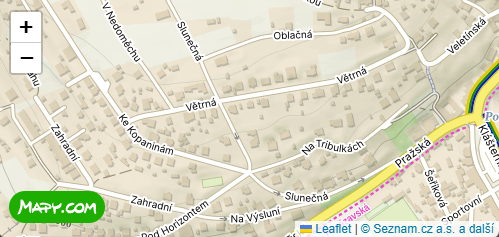
When displaying the map, it is necessary to:
- Display the selected Mapy.com logo variant
- The logo must be placed in a visible location above the map and in the same (or larger) size as in our tutorials. The minimum logo height is specified in the table. The logo must be the same size or larger than any other logos displayed above the map.
- The logo must be clickable and link to https://mapy.com/.
- Display the text copyright notice: “Seznam.cz a.s. and others”
- with a link to https://api.mapy.com/copyright.
- The copyright notice must be placed in a visible location above the map.
- You can easily copy the correct attribution setup from our tutorials by simply copying the code.
- The currently valid copyright text parameters and the logo URL are returned by the tile.json function.
When Using Other Features
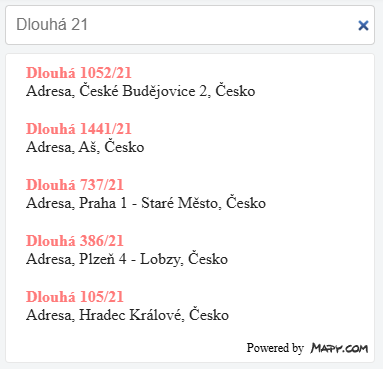
When using other features independently (geocoding, routing, etc.), it is necessary to:
- Display the selected Mapy.com logo variant
- The logo may be accompanied by the words “Powered by Mapy.com”, “Search by Mapy.com”, or “Routing by Mapy.com”.
- The logo must be placed near the data obtained using the feature or directly within the search/routing dialog.
- The minimum logo height is specified in the table.
- The logo may be clickable and link to https://mapy.com/.
The Static Maps feature handles attribution automatically, so there is no need to address it. The JS Panorama component does the same.
Note: if the above functions are used in close connection or directly above the map (i.e. when using this function, the map with the logo is also visible), the logo does not need to be mentioned again for these functions.