
Routing API
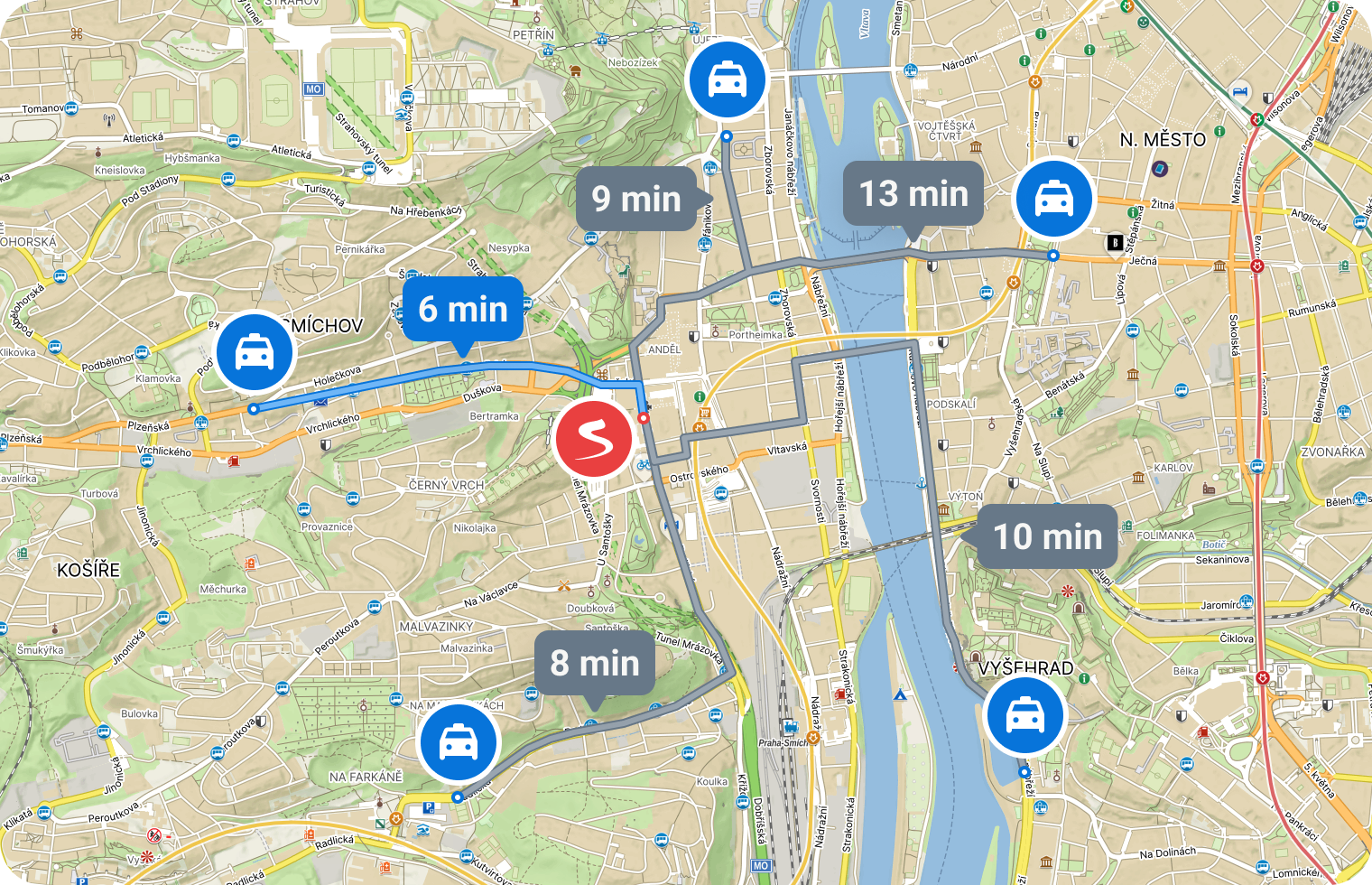
Planning is used to search for a route between two (or more) points. The function finds a suitable route based on the selected planning type (by car, on foot, …) and returns the length, time, and geometry of the found route.
Function Description
- Plan Route – The function plans a route between two (or more) points.
- Matrix routing – the function calculates times and distances between M origins and N destinations.
Check out Routing and Matrix routing tutorials.
Technical Documentation
https://api.mapy.com/v1/docs/routing/
The technical documentation provides an exact description of input and output parameters, default values, errors, and other details.
Plan route function
The function plans a route between a start and a destination, optionally through waypoints. It plans using the selected type of navigation (by car, by bicycle, on foot, etc.). It returns the length, time, and precise geometry of the given route.
You can try out the function in the Testing Laboratory.
Input parameters
| start, end | Coordinates of the start and destination |
| routeType | Route planning type – more details in the chapter Route planning type |
| lang | Preferred language – has no effect on this function |
| format | Output format of route geometry (geojson, polyline, polyline) |
| avoidToll | Avoid toll roads |
| avoidHighways | Avoid highways/motorways |
| waypoints | Route via points, maximum 15. The suggested route will lead from the start, through these waypoints (in the given order), to the destination |
| departure | (ISO-8601) Departure time in local time, e.g. ?departure=2025-01-01T00:00:00.000. If not provided, planning uses “now”. Departure time affects time-based closures and restrictions. |
Return values
| length | Route length in meters |
| duration | Estimated travel/passage time in seconds |
| geometry | Route geometry suitable for map rendering (in the selected format) |
| parts | (array) Individual route segments between waypoints (contain length and duration of the segment) |
| routePoints | (array) Detailed data about the start, destination and waypoints. originalPosition, mappedPosition and snapDistance describe the offset of the input point onto the service routing network. restricted = true indicates that the point lies in an area where routing would not normally be planned, but the route was still calculated because the user explicitly forced this point as a start, destination or waypoint. restrictionType then signals the reason. Possible values: – NO_ENTRY — No access / No vehicles or pedestrians allowed – RESTRICTED_ENTRY — Restricted access or entry (e.g. permit or payment required) – PEDESTRIAN_ZONE — Pedestrian zone – CLOSURE — Temporary closure – OTHER_RESTRICTION — Other traffic or planning restriction |
Function Matrix Routing
The function is used for routing between multiple points at once. A typical scenario might be determining which of 20 taxis is closest/fastest to the client. Generally, the function routes between N starts and M targets. For each route, it returns the length and time (not the geometry – to obtain geometry, calling the routing function is required).
The number of starts times the number of targets can be at most 100. It is possible to route, for example, 10×10, 1×100, 50×2, etc.
The price for calling matrix planning is fixed – per one function call. It does not depend on the number of planning used (the number of deducted credits is the same for a query of 50×2 or 12×1). You can find the specific price/number of credits on the price page.
Input Parameters
| starts | Array of start coordinates |
| ends | Array of target coordinates – optional; if not specified, routing between starts is planned |
| routeType | Type of routing – more in the chapter Routing Type |
| lang | Preferred language – not applicable to this function |
| avoidToll | Avoid toll sections |
Return Values
The function returns a matrix (two-dimensional array). Rows represent individual starting points, and columns represent individual target points.
starts: A,B,C
ends: X,Y,Z

matrix: [
   [AX AY AZ]
   [BX BY BZ]
   [CX CY CZ]
]
starts: A,B,C
(results AA,BB,CC are zero)
matrix: [
[AA AB AC]
[BA BB BC]
[CA CB CC]
]For each record, it returns:
| length | Length of the route in meters |
| duration | Estimated time to travel through/pass in seconds |
For a more detailed description of input and output parameters, error states, etc., refer to the Technical Documentation.
Planning Types
Planning supports various types of planning, according to which it optimizes the proposed route:
- car – fast – searches for a fast car route
- car – fast with traffic – searches for a fast car route considering the current traffic conditions, congestion, etc. (only in the Czech Republic, without considering traffic outside the Czech Republic)
- car – short – searches for a short car route
- foot – fast – searches for a fast walking route
- foot – hiking – searches for a walking route with a preference for hiking routes
- bicycle – road – searches for a route for road bicycles, with asphalt surface, preferring cycle paths and bike trails
- bicycle – mountain – searches for a route for mountain bikes, preferring cycle paths and bike trails regardless of the surface